• Skip to primary navigation
  • Skip to main content
  • Skip to primary sidebar
  • Home
  • About me / Work with me
  • Resource Library
  • Disclaimer & Privacy Policy
  • Nav Social Menu

    • E-mail
    • Facebook
    • Instagram
    • LinkedIn
    • Pinterest
    • Twitter

Lisa's Notebook

Curating Life’s Moments

  • Beauty
  • Family
  • Food & Drink
  • Garden
  • Home
  • Lifestyle
  • Reviews
    • Books
  • Style
  • Travel
  • Wellbeing
  • Work
    • Blogging
laptop-screen-extenders-for-streaming-setups

How Laptop Screen Extenders Enhance Your Streaming Setups *

29th April 2026      Lisa      2 Comments

AD | Streaming has exploded in popularity, and if you spend any time on YouTube or Twitch, you already know why. But behind every great stream is a setup that actually works. When the gear isn’t right, the experience falls apart fast – for the streamer and the audience. That’s why savvy creators are turning to tools like the laptop screen extender to level up their setup and keep everything running smoothly.

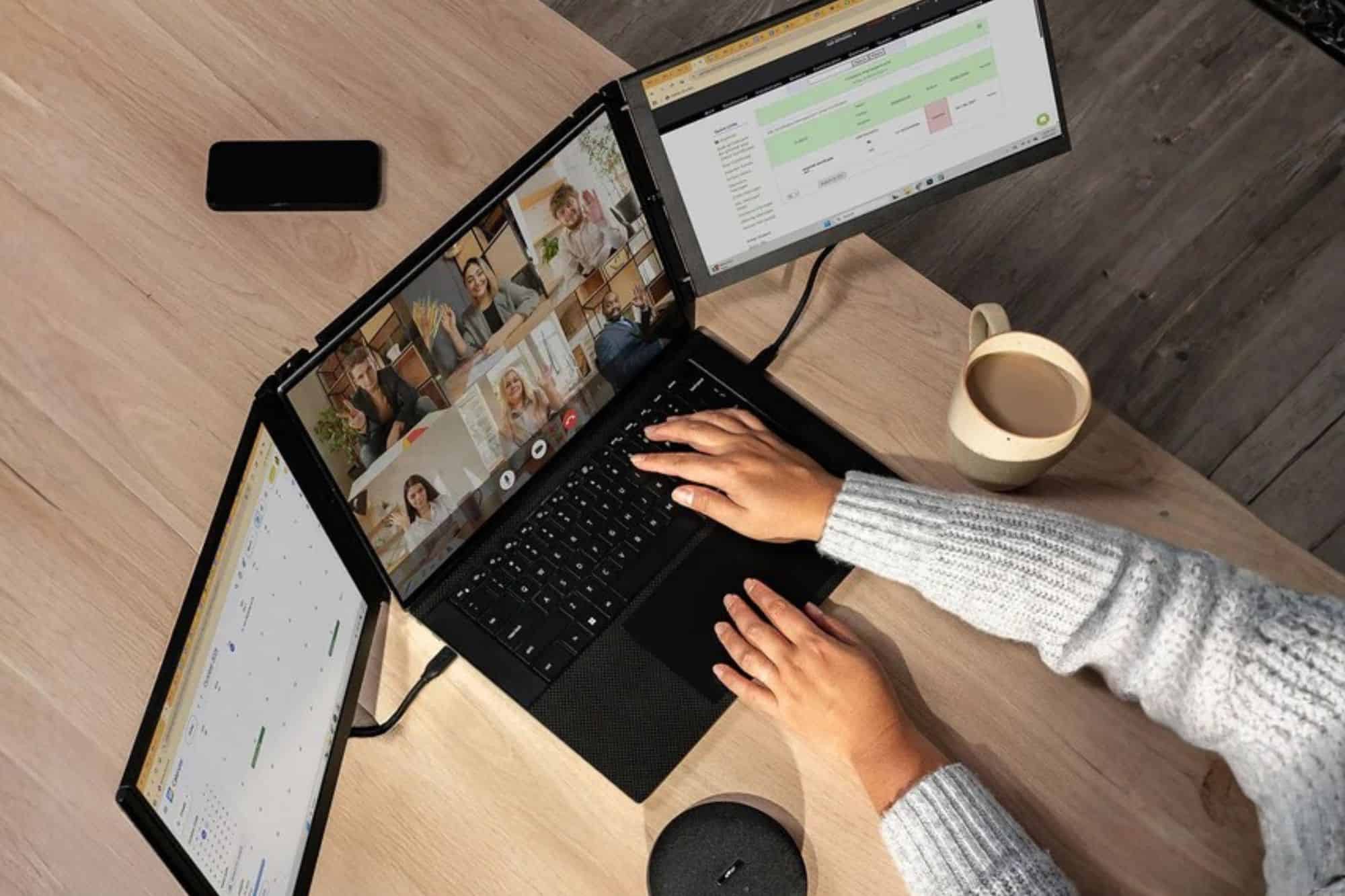
A laptop screen extender is a portable monitor that attaches to your existing laptop, giving you one or more additional displays without the need for a full desktop setup. For streamers, this means being able to keep your gameplay, live chat, streaming software, and analytics all visible at once. It eliminates constant window-switching and reduces the risk of on-stream mistakes. It’s one of the most practical upgrades a content creator can make to their workflow.

Contents

  • 1. The Reality of Modern Streaming Setups
  • 2. Why Multi-Screen Setups Matter for Streamers
  • 3. Key Ways Laptop Screen Extenders Improves Your Stream
    • 3.1. Real-Time Chat Monitoring
    • 3.2. Seamless Stream Control
    • 3.3. Content Preview & Quality Control
    • 3.4. Efficient Workflow for YouTubers
  • 4. Stream On…

The Reality of Modern Streaming Setups

From the outside, streaming looks like a dream job. The reality? It’s a constant juggling act. Streamers are simultaneously managing software updates, syncing audio, monitoring network stability, and keeping their audience engaged, often all at the same time. Miss one thing and your viewers notice. Drop a frame, forget to switch scenes, or let a chat message go unanswered for too long, and the immersion breaks. One of the smartest ways to take control of all those moving parts is simply adding an extra screen to your setup.

laptop-screen-extenders-for-streaming-setups-working

Why Multi-Screen Setups Matter for Streamers

Professional streamers rarely rely on a single display, and there’s a good reason for that. Multiple screens let you handle everything in real time – gameplay, live chat, notifications, and analytics – without constantly alt-tabbing between windows. That constant switching isn’t just annoying; it breaks your focus and introduces the kind of small errors that are hard to recover from mid-stream.

Options like the Mobile Pixels Trio laptop screen extender make this possible without a bulky desktop rig. You get the multitasking freedom of a full workstation in a portable package, with far less cognitive load during those long, intense sessions. Whether you’re streaming from a bedroom or home office setup or on the road at a gaming event, a laptop screen extender keeps your workflow tight.

Key Ways Laptop Screen Extenders Improves Your Stream

Real-Time Chat Monitoring

Dedicate one screen entirely to your live chat feed and you’ll never have to minimize your game to respond to a viewer message again. For Twitch and YouTube streamers, this alone is a game-changer. Chat interaction is the heartbeat of a live stream – viewers who feel seen and heard are far more likely to stick around, subscribe, and return. Staying present in the conversation builds community, and the benefit of faster response times is something your audience will feel, even if they can’t quite put their finger on why they enjoy your stream so much.

Seamless Stream Control

Keep your streaming software – OBS, Streamlabs, or whatever you prefer – open and visible on one dedicated screen at all times. No more fumbling through windows mid-broadcast. Fewer accidental scene switches. No more discovering you’ve been muted for ten minutes without realising it. Having your controls permanently in view means you’re always in command of what your audience sees and hears.

laptop-screen-extenders-for-streaming-setups-analytics

Content Preview & Quality Control

Run a live preview of your stream on a second display so you can catch frame drops, check visual alignment, and make sure your overlays are functioning correctly in real time – all without interrupting your main content. It’s the closest thing to having a director’s monitor, and it gives you a level of quality control that single-screen streamers simply can’t match.

Efficient Workflow for YouTubers

It’s not just live streamers who benefit. YouTubers can keep scripts or essential reference notes on one screen while editing footage or reviewing analytics on another, making the whole production process faster, more organised, and far less frustrating. When everything you need is visible at a glance, you spend less time searching and more time creating.

Stream On…

A laptop screen extender won’t change your content, but it will change how confidently and smoothly you deliver it. Once you’ve experienced streaming with an extended setup, going back to a single screen will feel like working with one hand tied behind your back. So why not give it a go, and see what a difference a little extra screen real estate can make to your creativity, your workflow, and your viewers’ experience?

Have you ever considered investing in an extra screen for your work? Do you think it would help your workflow and creativity too?

* This is a collaborative post – please see my Disclaimer.
laptop-screen-extenders-for-streaming-setups-pinterest

laptop-screen-extenders-for-streaming-setups-pinterest

Share this post:

Share on X (Twitter)Share on LinkedInShare on PinterestShare on FacebookShare on E-mailShare on WhatsAppShare on BlueskyShare on RedditShare on TelegramShare on SMS

You may also like...

Is a Boho Wedding Right For You? *

Top 7 Work Habits Of Successful People *

3 Top Ways to Invest in Your Career This Year *

Reader Interactions

Comments

  1. Karalee says

    15th May 2026 at 9:11 am

    I had no idea there were screen extenders for laptops! It does seem like it can useful for people who work at home too.

    Reply
    • Lisa says

      15th May 2026 at 7:17 pm

      They absolutely are, I love mine!

      Reply

Leave a Reply Cancel reply

Your email address will not be published. Required fields are marked *

Primary Sidebar

About Me

Lisa McLachlan - Copywriter + Comms Manager
I'm Lisa, a Copywriter & Communications Manager from Bath, working with marketing teams to fill capability gaps and craft digital marketing strategies for businesses. I'm also a mum of one, cat concierge, gardener, and Plantagenet enthusiast!

Get in touch

get-in-touch

Find me here

  • E-mail
  • Facebook
  • Instagram
  • LinkedIn
  • Pinterest
  • Twitter

Looking for…

Get notifications of my new posts

Thank you for subscribing! Please check your inbox or spam folder to confirm your subscription.

Affililates Disclosure

If you click on some of the links on this website and then purchase a product from a retailer, I will receive a small commission at no cost to you.

Amazon Associates Disclosure
As an Amazon Associate I earn from qualifying purchases.

Who wants healthy, vibrant, glowing skin?

Get £10 off when you shop at Revive Collagen with my link

Beautiful Stock Photos to make you stand out – plus get your first 25 pics free!

Gorgeous stock photo library images

Affordable, reliable web hosting with a ton of extra benefits!

Get 10% off your first year's hosting with my link and LISASNOTEBOOK10 code

Gorgeous garden picks from Amazon

Garden picks from Amazon

Professional Insurance For Freelancers, Businesses, Charities, & Groups With A Personal Touch

Get £20 from Policy Bee when you sign up with my referral link

Archives

Popular posts

Actionable SEO tips for your blog

Actionable SEO Tips for your Blog *

COVID-19 Lockdown Silver Linings - chocolate twists!

COVID-19 Lockdown Silver Linings – 4 things I’m grateful for in isolation

Edible plants to grow indoors - lavender

11 Easy and Delicious Edible Plants to Grow Indoors

Simple ways to practise self-care during isolation - hot chocolate, flowers, and blanket

5 Simple Ways to Practise Self-Care During Isolation *

Comfort food and easy bakes

Irresistible Comfort Food – My Top 5 Easy Bakes

PMD Clean PRO Smart Facial Cleansing Device

PMD Clean PRO Smart Facial Cleansing Device – review *

🌈 Our beloved hobo has taken his last journey. Yes 🌈 Our beloved hobo has taken his last journey. Yesterday evening we had to say farewell to Ginger at nearly 21 years old. 

13 years ago he wandered into our greenhouse and decided ours was his new home. So many memories:

😻 He saw us through Buzz, Lily, and Jester, and the arrivals of Spooky, Loki, and Lyra. 
😻 Always the most chilled cat, not interested in fighting any other cats, ours or visitors.
😻 Greediest cat ever, not even willing to share with the resident hedgehogs. He could hear the sound of someone walking into the kitchen from 5 miles away.
😻 An inveterate bin diver – our neighbours got used to seeing their recycling spread across the road after he’d gone searching for food.
😻 Always commandeering the warmest spot in the garden or house.
😻 Putting up with Spooky always seeking him out and snuggling up with him.
😻Somehow generating more heat than a volcano, so we could never tolerate him on our laps for more than 10 minutes, we’d have to move him next to us instead.
😻 Always knowing when any of us needed comfort or company and snuggling up to offer purring support.

RIP, Ginger, thank you for choosing us, we were privileged to have you as part of our family, and you leave the biggest hole in all our hearts. 😿
Beautiful few hours working in the garden yesterda Beautiful few hours working in the garden yesterday, with my little black panther keeping me company. Love you, Loki! 🖤


#catlover #blackcatclub #catoftheday #adoptdontshop #catsprotection
These gorgeous little Laccaria Laccata are really These gorgeous little Laccaria Laccata are really flourishing at the bottom of our orchard. 🍄‍🟫

Aka Common Laccaria, Waxy Laccaria, Lackluster Laccaria, Deceiver, apparently they’re edible. But as I’m not a fungi expert, I don’t think I’ll be harvesting them for mushrooms on toast any time soon!


#mycologyphotography #mushroomlover #fantasticfungi #inmygardentoday #autumngarden
Brightening up a Monday morning with one of our ha Brightening up a Monday morning with one of our hardy little cyclamens. 😍 

If you don’t have any of these perennials in your outside space, you’re missing a trick. 

Happy in pots, baskets, and the ground, ours have survived frost, snow and can’t be beaten for fabulously cheerful pops of colour at this time of year. Highly recommended! 👌


#novembergarden #cyclamen #redflowers #winterflowers #inmygardentoday
Trowbridge’s beautiful park is such a treat to vis Trowbridge’s beautiful park is such a treat to visit. And in Autumn, it’s even more special as a whole tribe of practically tame squirrels descend, searching for food. I swear we could have hand fed this one, he was so friendly! 🐿⠀

#lisasnotebook #squirrel_lovers_club #squirrellove #naturephotography #wildlifephotography #autumnvibes🍁 #momentsofmine❤️ #trowbridge #visitwiltshire #swisbest
With a cold snap forecast, it’s time to bring in t With a cold snap forecast, it’s time to bring in the geraniums and pelargoniums to overwinter in the conservatory. And to prune them hard, taking lots of cuttings for new plants. I do this every year, and my plant loving friends all know what they’ll be getting in due course! 💖


#lisasnotebook #pinkflowers🌸 #gardendiary #autumngardening #autumnflowers #overwintering #novembergarden #allthingsbotanical #botanicalbeauty #flowermagic #whimsicalwonderfulwild #inmygardentoday #gardeningisfun
Follow me on Instagram

Copyright © 2026 · Lisa's Notebook

This website uses Google cookies to ensure you have the best visitor experience and to analyse traffic. Please note if you continue to use this site, I will assume that you are happy with this :)